Find, count, and edit.
Filter model elements, inspect instance and type parameters, renumber, transform, and update in bulk.
DeepOctopus works inside Autodesk Revit. Describe a task in plain language to find elements, edit parameters, prepare schedules and sheets, or check the model. Review proposed changes before applying them.
You review and validate the results.
Room numbering and lighting checks.
Find elements, check parameters and prepare edits. You approve the result.
Find doors, edit parameters or prepare documentation. DeepOctopus helps with the steps; you review the output.
Review selected elements before confirming changes.
Handle repetitive model checks, parameters, views and documentation without writing scripts.
Filter model elements, inspect instance and type parameters, renumber, transform, and update in bulk.
Create and organize views, sheets, sections, elevations, and view templates.
Create schedules with fields, filters, sorting, grouping, and formatting.
Review Revit warnings, duplicate elements, unenclosed rooms, and model inconsistencies.
Manage category visibility, graphics, view filters, worksets, and annotation display.
Explore electrical circuits, panel loads, project parameters, and Excel import/export workflows.
Recorded examples of model checks.
Find and review potential duplicates.
Find unused elements and inspect the result.
The assistant prepares the work. A person validates the result and decides which changes to apply.
Human validation remains part of the workflow.
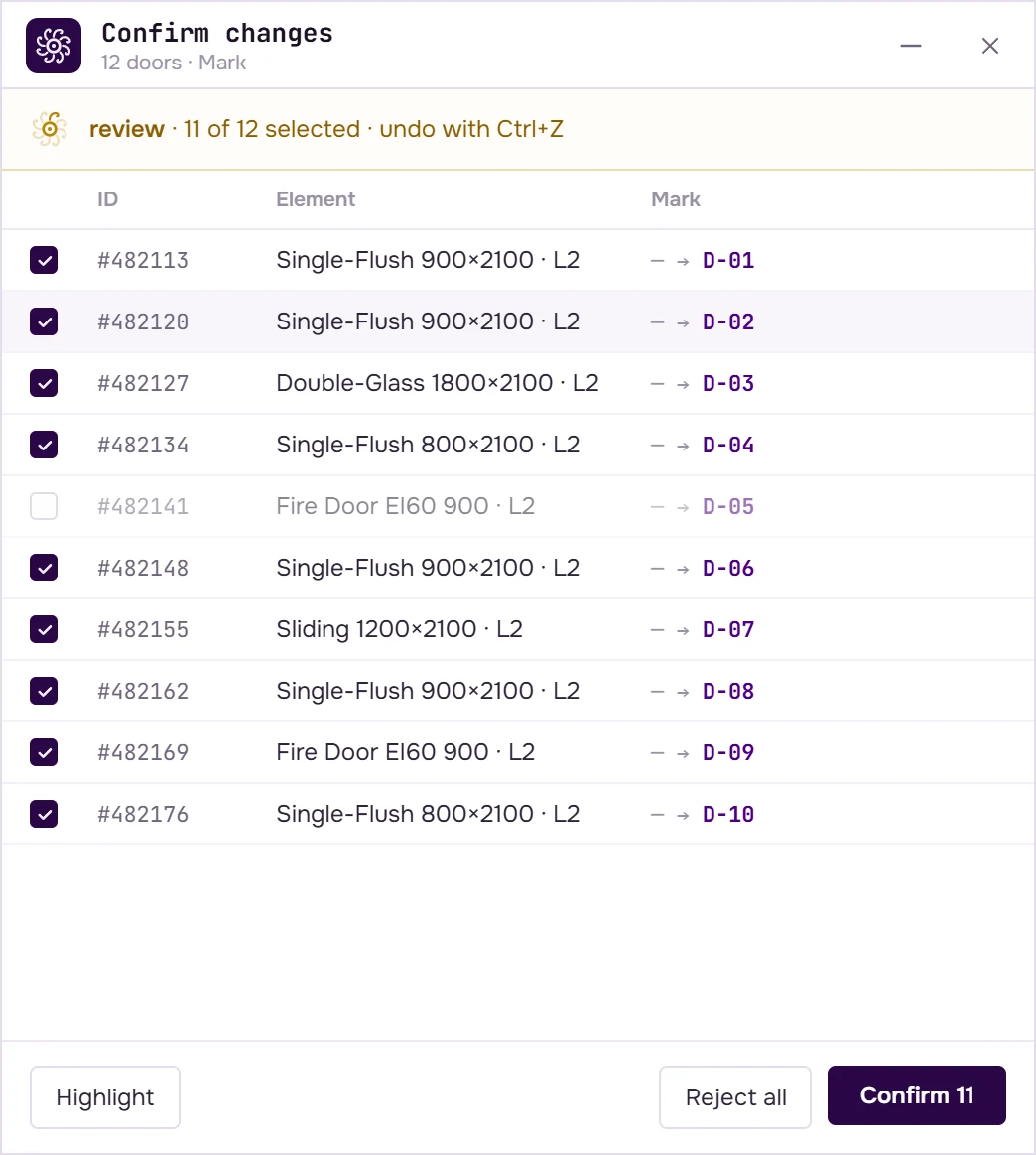
Describe the task. Review the output. Confirm changes.
Bring up Octopus in the project you're working on.
Describe elements, parameters, documentation, or the checks you need.
Validate the result and approve changes.
Want to discuss DeepOctopus for your Revit team? Send us a message.
Ask about licenses, compatibility, or using DeepOctopus in your workflow.
Contact ussupport@deep-octopus.com
Explore how AI-assisted workflows can reduce repetitive setup and keep BIM teams focused on model quality.
Filtering elements, selecting exact parameters, reviewing values, and applying controlled changes.
Read the workflow 02 / DOCUMENTATIONFrom schedule fields and filters to sheet organization and view placement.
Read the workflowDeepOctopus is an independent AI agent designed to work inside Autodesk Revit. It helps BIM teams use natural-language requests for model element selection, parameter updates, documentation tasks, and model checks. Create an account to explore available licensing options.
Its workflow areas include finding and filtering elements, working with instance and type parameters, preparing schedules and sheets, managing views, and checking for potential model issues. Available actions depend on the task and Revit project.
Describe a task in plain language, review the elements or settings involved, and confirm the proposed operation when appropriate. The aim is to reduce repetitive steps while keeping BIM professionals responsible for checking the result.
DeepOctopus is designed to help select elements, inspect parameters, and prepare bulk value changes. Check the affected elements and parameter type before applying edits. See the bulk parameter editing guide for a worked example.
Schedule and sheet workflows are part of DeepOctopus's scope, including fields, filters, view preparation, and sheet organization. Results depend on the model and documentation standards and should be reviewed in Revit.
DeepOctopus provides a natural-language interface for supported Revit workflows. It is not a guarantee that every custom Dynamo graph, Python script, or office-specific automation can be replaced.
DeepOctopus supports confirmation modes. You can review selected elements and proposed edits before applying changes; an automatic mode is available for supported operations when enabled. Always validate results in your project.
Supported Revit versions vary by release. Contact support@deep-octopus.com to check compatibility before installing.
No. DeepOctopus is an independent product designed for Autodesk Revit. Autodesk and Revit are trademarks of Autodesk, Inc.
Choose Create account to register. Available licenses and pricing are shown in your account when offered. For questions, email support@deep-octopus.com.